Make your own datapack
A datapack is a world for Formation Theory to be played in - its countries, leagues, clubs, players, coaches, fixtures and cups. The game lists every datapack it finds when it starts, and the one you choose is the world your career is played in.
What a datapack is
A folder with two files in it:
My World/
  datapack.json   the name, date and description the game lists
  game.db         the world itself, a SQLite database
A whole world
Clubs, squads, coaches, leagues, fixtures and cups, in the same shape as the world the game ships with.
Its own career
Every datapack keeps a career of its own. Switching worlds never touches another world's save.
Played offline
The transfer market, the club's Balance, coins and boosts are on the built-in world only.
Quick start
The easiest way to make a datapack is to start from the world the game ships with and change it.
- 1
Play the built-in world once
Start the game and pick the built-in world, so it copies its world out to your computer.
- 2
Copy its world.db
Make a folder for your datapack inside the datapacks folder, copy world.db from the game's folder into it and rename it game.db.
- 3
Change what you like
Open game.db in a SQLite editor - DB Browser for SQLite is free and is all you need - and rename clubs, edit players, move squads.
- 4
Name it and play
Write a datapack.json beside it, start the game, and pick your datapack from the list.
The game's folder is the one above datapacks - see where datapacks go. DB Browser for SQLite is at sqlitebrowser.org.
datapack.json
What the start-up list shows for your datapack:
{
  "name": "Lower Leagues 2026",
  "date": "2026-09-14",
  "description": "Every club two divisions down, with the squads of the season's first day.",
  "author": "Your name"
}| Field | What it is |
|---|---|
name | What the list calls it. Without one, the folder's name is used. |
date | When it was made, or the day it describes, as YYYY-MM-DD. Shown as “14 Sep 2026”. |
description | A sentence or two, shown in full under the name. |
author | Optional. Shown as “by …” beside the date. |
The file is optional - a folder holding only a game.db is listed under the folder's name - but a datapack without a date or a description is hard to choose.
The start-up list
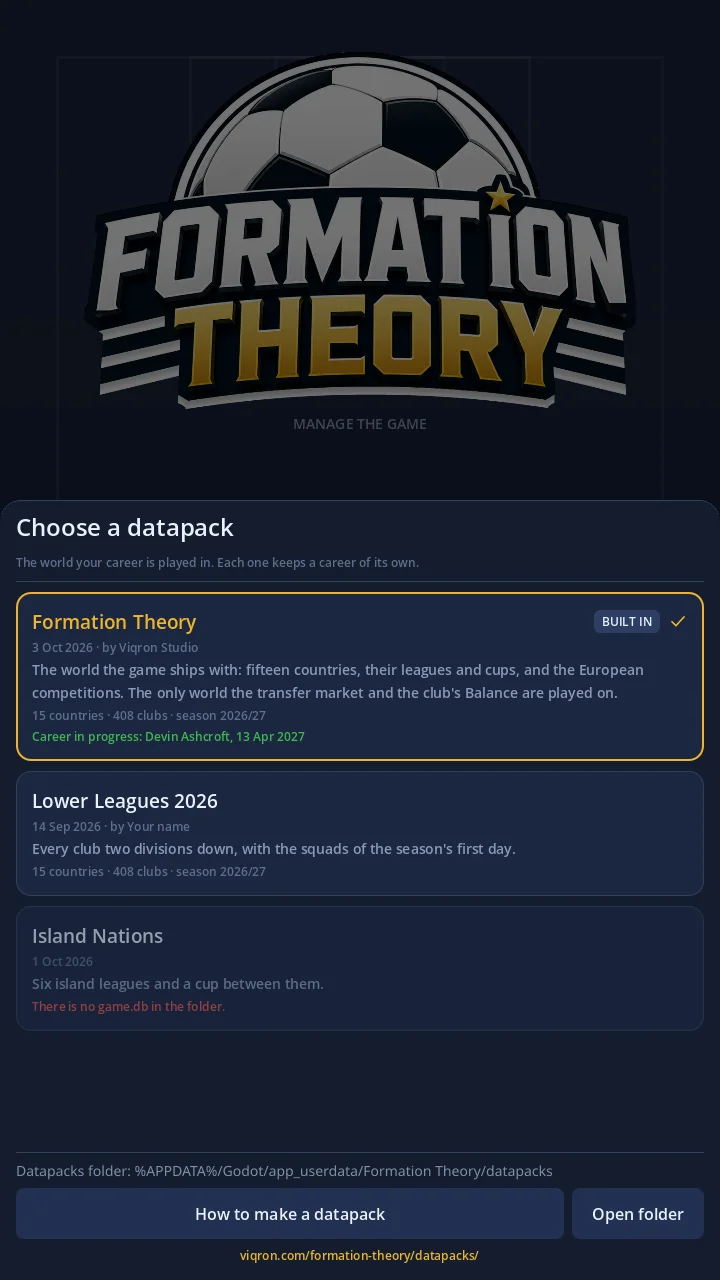
Every time the game starts it reads the datapacks folder and asks which world to play in. The built-in world is always first; the datapacks follow by name, with the ones that cannot be played after the rest.
- The name, then the date and by the author, then the description - or No description. when there is none.
- How big the world is, read from its own
game.db: its countries, its clubs and its season. - The career saved on it, in green: the manager and the date the career has reached.
- A datapack that cannot be played is dimmed, with the reason in red - see what each one means.
Beneath the list are the datapacks folder's full path, a link to this page and, on a computer, an Open folder button. The world you choose is remembered and ticked at the next start.
What you can change
Anything in the data, as long as the shape stays the same: the game reads the tables and columns by name.
- Names - clubs (
teams.name,short_name,city,stadium), players (first_name,last_name), coaches (staff), leagues, cups and countries. The commonest datapack, and the safest. - Clubs -
capacity,reputation,budget_transfer,budget_wage, and the kit'sprimary_colorandsecondary_coloras#rrggbb. - Players - every ability runs 1 to 99.
overallis what lists show, so change it with the abilities;potentialis a hidden talent from 1 to 100. A player plays for the club inteam_id. - New players - give each a new
idunder 9,000,000 (the game numbers its academy players from 9,000,000 and the market's from 10,000,000) and asquad_numberfree at his club. - New fixtures - keep their
idunder 10,000,000: the game stores the cup ties it draws from there up.
Rules a world keeps
Break one of these and a club cannot field a side, or a season cannot be played.
Every club needs at least
By detail_position, so that it can line up in every formation the game has:
Only a player's detail_position counts - the roles in alt_positions do not. The built-in world gives every club twenty-six players; thirty is the most a squad may hold.
- Every league's fixtures are complete: each club plays each other club home and away,
matchdayruns from 1, a club plays once on a date, and every date is in the season.leagues.team_countis the number of clubs in it. - Results stay out of the world: leave
played,home_scoreandaway_scoreas they are andleague_tableat zeros. The game keeps results with the career. - The meta table carries
schema_version,season(e.g.2026/27) andseason_start(2026-08-08). Leaveschema_versionalone: it says which version of the game the world was made for.
The tables and columns the game reads
A world without one of these tables is listed dimmed and cannot be chosen:
The 36 columns of players
Checked when a datapack is opened; the first one missing is named. Other tables are read the same way, so keep every column of the game's own world.db.
Moving a club to another league, adding a league or changing the cups means changing the fixtures, the cup rounds and the cup entries to match - possible, but check your work by playing a few matchdays.
Where datapacks go
Each datapack is one folder inside the datapacks folder. The game's start-up list shows the full path, and on a computer its Open folder button opens it.
%APPDATA%\Godot\app_userdata\Formation Theory\datapacks\~/Library/Application Support/Godot/app_userdata/Formation Theory/datapacks/~/.local/share/godot/app_userdata/Formation Theory/datapacks/The datapacks folder is in the app's private storage, which a file manager cannot reach. Datapacks on Android are not supported yet without developer tools.
Careers and datapacks
- Each datapack keeps a career of its own. Starting the game on another world never touches the career on this one, and the list says which worlds have a career in progress, with the manager and the date.
- The career is kept by the datapack's folder name. Rename the folder and the game sees a new datapack with no career; rename it back and the career is there.
- Replacing a datapack's game.db updates its world under the career. Keep the ids of everything that already exists, or the career will look for players and fixtures that are no longer there.
- The transfer market, the club's Balance, coins and boosts are played on the built-in world only. Every price and budget on the server is worked out from that world, so a career on a datapack plays offline: matches, the squad, tactics, training, the cups and the calendar all work, and the screens that need the server say why they cannot be used.
When a datapack cannot be chosen
A datapack the game cannot play is still listed, dimmed, with the reason in red beneath it. What each one means:
The world has to be called game.db, directly inside the datapack's folder - not in a folder of its own inside it.
A missing comma or quote. Paste the file into any JSON checker; it will point at the line.
The file is not a SQLite database, or another program has it open. Close your SQLite editor and start the game again.
A table the game reads is missing. Start again from the game's own world.db rather than an empty database.
The world was made for another version of the game. Remake it from the world.db of the version you are playing - Settings' World data row shows which version that is.
The meta table needs schema_version, season and season_start. Copy them from the game's own world.db.
The teams table is empty.
A column of the players table was dropped or renamed. Shown when the datapack is opened; put the column back.
The datapack was chosen, then its game.db was moved or deleted before the game opened it. Put it back, or start the game again and choose another world.